How to Deactivate Instagram Temporarily: Step-by-Step Guide

To temporarily deactivate Instagram, open Accounts Center, go to Personal details, choose Account ownership and control, select Deactivation or deletion, choose your Instagram account, select Deactivate account, and confirm. Your profile, photos, comments, and likes stay hidden until you log back in. Instagram currently limits temporary deactivation to once per week.
How to Temporarily Deactivate an Instagram Account
You can temporarily deactivate an Instagram account without permanently deleting your profile or content. When the account is deactivated, Instagram hides your profile, photos, comments, and likes until you reactivate the account by signing in again. This makes deactivation useful when you want to take a break without losing the account.
Instagram now routes the process through Accounts Center. You can use the Instagram app, a mobile browser, or a computer. The exact position of a menu can vary slightly by device or app version, but the core path is the same: Accounts Center > Personal details > Account ownership and control > Deactivation or deletion.
Before You Deactivate Instagram
Before deactivating Instagram, make sure you can sign in to the account and understand that deactivation is temporary. You will need access to your password during the confirmation flow, and Instagram currently allows temporary deactivation only once per week.
- Make sure you know the password for the account you want to deactivate.
- Check that you selected the correct Instagram profile if multiple accounts are connected in Accounts Center.
- Remember that deactivation hides the account. It does not permanently erase your posts, followers, or profile.
- If your goal is only to limit visibility, consider making the account private instead of deactivating it.
How to Deactivate Instagram on the App
To deactivate Instagram on iPhone or Android, open your profile, enter Settings and activity, open Accounts Center, and continue to the Deactivation or deletion menu. The process is nearly identical on both platforms.
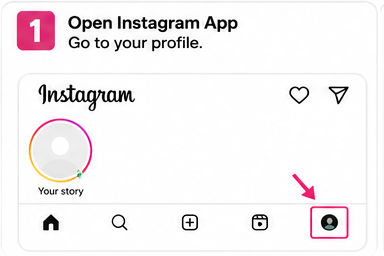
Step 1: Open your Instagram profile
Open the Instagram app and sign in to the account you want to deactivate. Tap your profile picture in the bottom-right corner to open your profile.
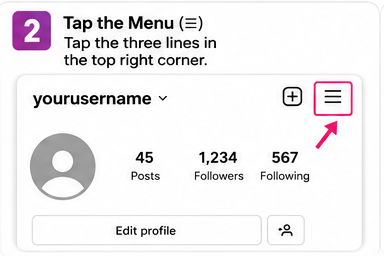
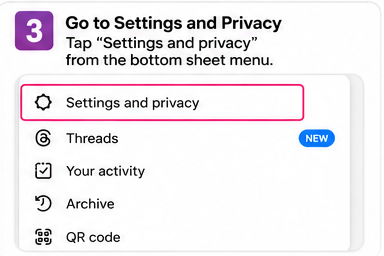
Step 2: Open the settings menu
Tap the menu icon in the top-right corner of your profile. Depending on the current app layout, Instagram may label this area Settings and activity.
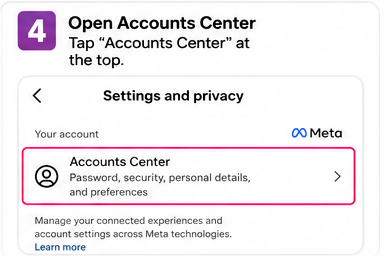
Step 3: Open Accounts Center
In Settings and activity, find and open Accounts Center. This area manages connected Meta accounts and account-level controls.
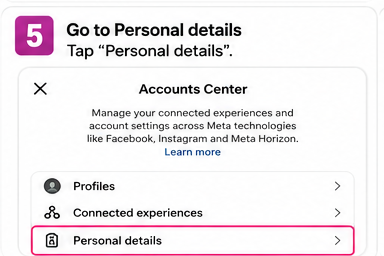
Step 4: Select Personal details
Inside Accounts Center, tap Personal details. This section contains identity, contact, and account ownership settings.
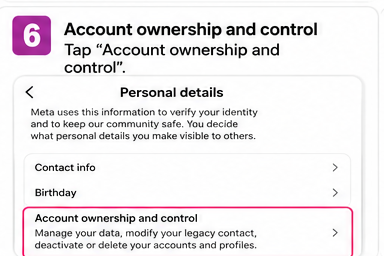
Step 5: Open Account ownership and control
Tap Account ownership and control, then choose Deactivation or deletion.
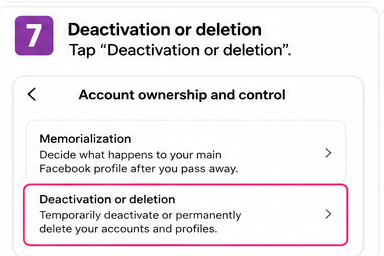
Step 6: Choose the Instagram account
If Accounts Center contains more than one profile, select the Instagram account you want to deactivate. Double-check the username before continuing.
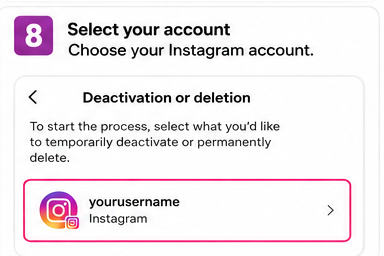
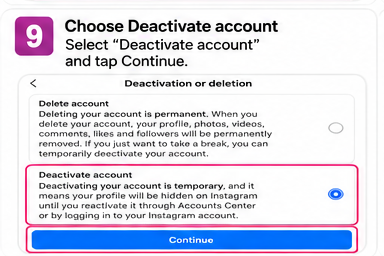
Step 7: Select Deactivate account
Choose Deactivate account rather than Delete account. Tap Continue to move to the confirmation steps.
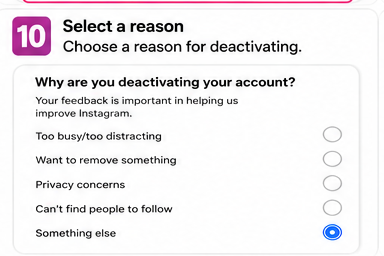
Step 8: Confirm your password and reason
Instagram may ask you to re-enter your password and choose a reason for deactivating. Complete the requested fields, tap Continue, and review the final confirmation screen.
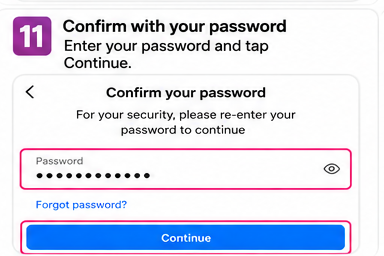
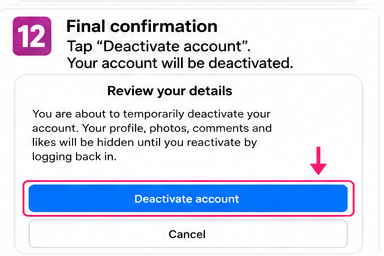
Step 9: Confirm temporary deactivation
Tap Deactivate account on the final screen. Your Instagram profile should then become hidden until you reactivate it by logging in again.
How to Deactivate Instagram on a Computer
You can also temporarily disable Instagram from a desktop browser. Sign in at Instagram, open Settings, enter Accounts Center, and follow the same account ownership path used in the mobile app.
- Open Instagram in your browser, sign in, click More in the lower-left area, and choose Settings.
- Select Accounts Center, then choose Personal details.
- Open Account ownership and control, choose Deactivation or deletion, and select the Instagram account you want to pause.
- Choose Deactivate account, click Continue, enter your password if requested, select a reason, and confirm the deactivation.
What Happens When You Deactivate Instagram?
When you deactivate Instagram, your account becomes temporarily hidden rather than erased. Your profile, photos, comments, and likes are hidden until you sign back in and reactivate the account.
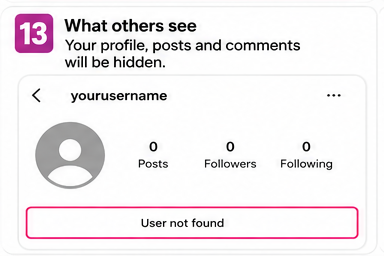
- Your profile is not normally visible to other Instagram users while deactivated.
- Your posts and account activity are hidden instead of permanently deleted.
- Your followers are not intentionally removed as part of temporary deactivation.
- You can return by logging in again with your account credentials.
Temporary deactivation is different from Instagram disabling an account for policy or security reasons.
How to Reactivate Instagram After Deactivation
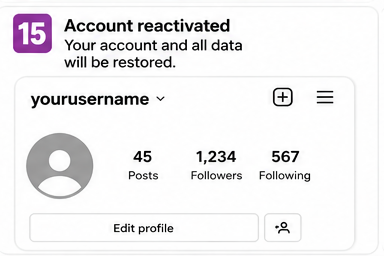
To reactivate a temporarily deactivated Instagram account, sign back in with the username and password for that account. Instagram generally restores access as part of the login process, so there is no separate reactivation menu you need to find.
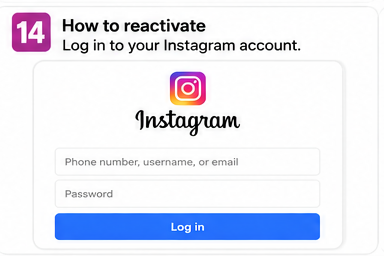
- Open the Instagram app or Instagram website.
- Enter the username, email address, or phone number associated with the account.
- Enter the password and sign in.
- If Instagram asks for an additional verification step, complete it to regain access.
Deactivate vs. Delete Instagram: What Is the Difference?
Deactivation is the better option when you want a reversible break. Deletion is intended for users who want to permanently remove the account and its content after Instagram completes the deletion process.
| Feature | Temporarily deactivate | Permanently delete |
|---|---|---|
| Profile visibility | Hidden until reactivation | Removed after deletion is completed |
| Posts and likes | Hidden | Scheduled for permanent removal |
| Return to the same account | Yes, by signing back in | Not after permanent deletion is completed |
| Best for | Taking a temporary break | Leaving Instagram permanently |
Why Can't I Deactivate My Instagram Account?
If Instagram does not let you deactivate the account, the issue is usually related to account access, the weekly deactivation limit, the selected profile, or a temporary Accounts Center problem. Check the items below before trying again.
- You recently deactivated and reactivated the account. Instagram states that an account can only be deactivated once per week.
- You cannot sign in or do not know the account password.
- You selected a different profile inside Accounts Center.
- The app interface is outdated or a menu is not loading correctly. Updating the app or trying a browser can help.
- Accounts Center may temporarily not offer the option for the account. Meta notes that deactivation through Accounts Center may not always be available.
FAQ
How do I deactivate my Instagram account temporarily?
Go to Accounts Center, open Personal details, select Account ownership and control, choose Deactivation or deletion, select your Instagram account, choose Deactivate account, and confirm the requested steps.
Can I deactivate Instagram on my phone?
Yes. Instagram states that temporary deactivation can be completed from the Instagram app or a mobile browser, as well as from a computer.
How do I disable Instagram without deleting it?
Use the temporary Deactivate account option in Accounts Center. Do not choose Delete account if you want to preserve the account for later use.
How long can I keep Instagram deactivated?
Temporary deactivation is designed to keep the account hidden until you reactivate it by logging back in. Instagram does not require you to reactivate immediately.
Can people see my profile while Instagram is deactivated?
Instagram states that your profile, photos, comments, and likes are hidden while the account is temporarily deactivated.
Do I lose followers when I deactivate Instagram?
Temporary deactivation is not designed to delete your follower list. The account and its content are hidden until reactivation.
Can I deactivate Instagram more than once?
Yes, but Instagram states that you can only deactivate the account once per week.
Is disabling Instagram the same as deactivating it?
People often use disable, pause, close, and deactivate to mean the same temporary action. In Instagram settings, the relevant option is Deactivate account.
What is the difference between Instagram deactivating my account and me deactivating it?
Voluntary temporary deactivation is something you choose in Accounts Center. An account disabled by Instagram can be related to Community Standards or account enforcement and follows a different recovery process.