How to Delete an Instagram Account Permanently (2026 Guide)


You can permanently delete an Instagram account through Meta's Accounts Center on the Instagram app or a web browser. Open your account settings, enter Accounts Center, select the Instagram profile you want to remove, and choose Deactivation or deletion. Instagram normally provides a cancellation period before the account and its information are permanently deleted.
Deleting an account is different from uninstalling Instagram, logging out, or removing saved login information from your phone. Those actions only remove access from the device. They do not delete your profile, posts, followers, comments, or account data.
This guide explains how to delete your Instagram account on a phone or computer, what happens after deletion, and what to check before confirming your request.
Quick Steps to Delete an Instagram Account
To delete your Instagram account, go to Settings, open Accounts Center, find the profile management or personal details section, and select Deactivation or deletion. Choose the correct Instagram profile, select Delete account, and follow the confirmation instructions.
The general path is:
- Open Instagram and visit your profile.
- Open the menu in the top-right corner.
- Select Accounts Center.
- Open Profiles and personal details, Manage accounts, or Personal details.
- Select Deactivation or deletion.
- Choose the Instagram account you want to remove.
- Select Delete account.
- Tap Continue and complete the confirmation process.
Meta occasionally changes the names and positions of menu options. Depending on your app version, you may see Manage accounts, Profiles and personal details, or Account ownership and control before reaching the deletion option.
What Should You Do Before Deleting Instagram?
Before deleting Instagram, download any photos, videos, account records, or other information you may want to keep. Once the account has been permanently deleted, you will no longer be able to use Instagram's information export tool for that profile.
You should also check the following:
- Make sure you are signed in to the correct account.
- Save photos and videos that are not stored elsewhere.
- Export your Instagram information.
- Check whether the account manages business assets or advertising accounts.
- Inform important contacts when necessary.
- Cancel subscriptions connected to the account.
- Consider temporary deactivation if you are uncertain.
If several Instagram or Facebook profiles are connected through Accounts Center, pay close attention to the profile shown on the confirmation screen. Deletion should only be confirmed after verifying the username and profile picture.
How to Download Your Instagram Information
You can download your Instagram information from the Your information and permissions section of Accounts Center. Select Export your information, create an export, and choose the profile and information you want Instagram to prepare.
A typical path is:
- Open your Instagram profile.
- Tap the menu icon.
- Open Accounts Center.
- Select Your information and permissions.
- Tap Export your information.
- Select Create export.
- Choose your Instagram profile.
- Select the information, date range, format, and delivery method.
- Submit the export request.
Instagram may allow you to export information in formats such as HTML or JSON. HTML is generally easier to review in a browser, while JSON is more suitable for transferring or processing structured data.
How to Delete an Instagram Account on a Phone
You can delete an Instagram account on an iPhone or Android device through the Instagram app. The deletion setting is located inside Accounts Center rather than the main profile editing screen.
Step 1: Open Your Instagram Profile
Open the Instagram app and tap your profile picture in the bottom-right corner. Confirm that the username at the top of the screen belongs to the account you want to delete.
This check is especially important when multiple accounts are saved in the same Instagram app.
Step 2: Open the Settings Menu
Tap the three-line menu in the top-right corner of your profile. The menu may open a page called Settings and activity or display account options directly.
Look for Accounts Center, which is usually displayed near the top of the settings page.
Step 3: Enter Accounts Center
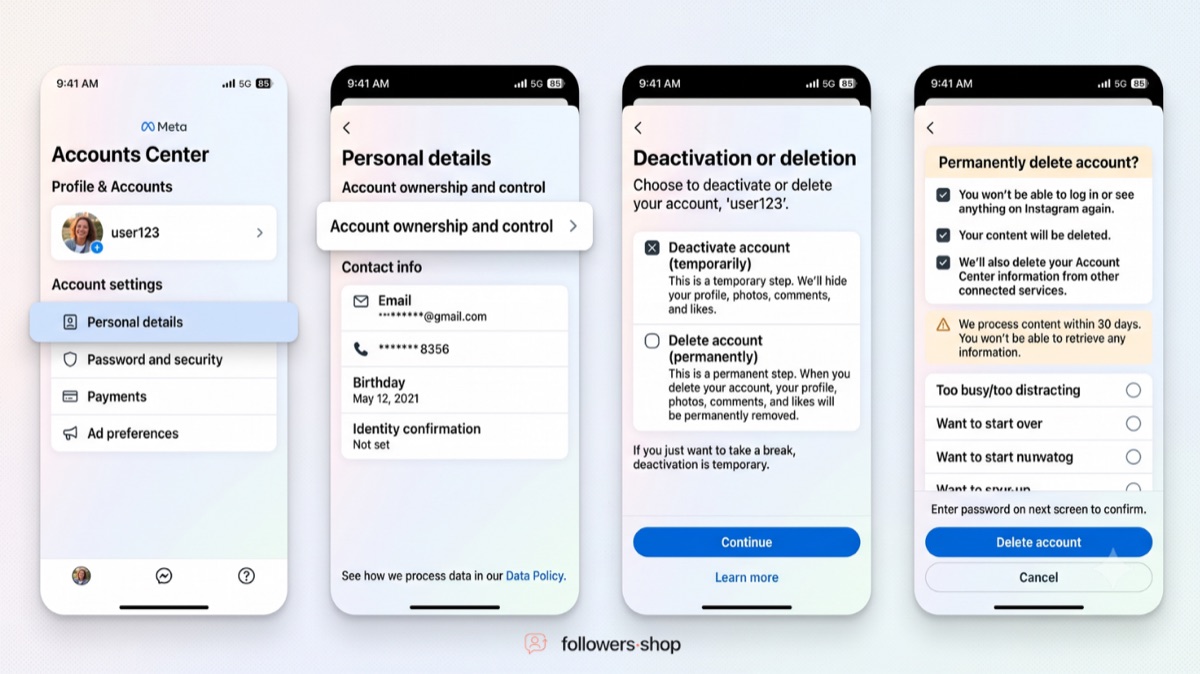
Tap Accounts Center to access settings shared across your connected Meta profiles. This is where Instagram currently places profile deletion and deactivation controls.
Depending on your app version, continue through one of these paths:
- Accounts Center > Profiles and personal details > Manage > Deactivation or deletion
- Accounts Center > Personal details > Account ownership and control > Deactivation or deletion
- Accounts Center > Manage accounts > Manage > Deactivation or deletion
These differences usually reflect interface testing, app versions, or regional account layouts. The final option you need is always Deactivation or deletion.
Step 4: Select the Correct Instagram Account
Choose the Instagram profile you want to permanently delete. If several Facebook or Instagram accounts appear, verify the username before continuing.
Selecting one profile does not mean that every profile shown in Accounts Center will be deleted. The confirmation process applies to the profile you select.
Step 5: Choose Delete Account
Select Delete account, not Deactivate account, and tap Continue. Instagram may ask why you want to delete the account and request your password again.
Review the deletion date shown on the final screen. This tells you when your account is expected to become permanently unavailable.
Step 6: Confirm the Deletion Request
Complete the security check and confirm that you want to delete the account. Your deletion request is then scheduled according to the date displayed by Instagram.
During the cancellation period, other Instagram users should not be able to access your profile or its content. The exact number of days available to cancel can vary by region, although Instagram commonly displays a 30-day period.
How to Delete an Instagram Account on a Computer
You can delete your Instagram account from a desktop or laptop by opening Instagram in a browser and accessing Accounts Center. The main deletion options are similar to those found in the mobile app.
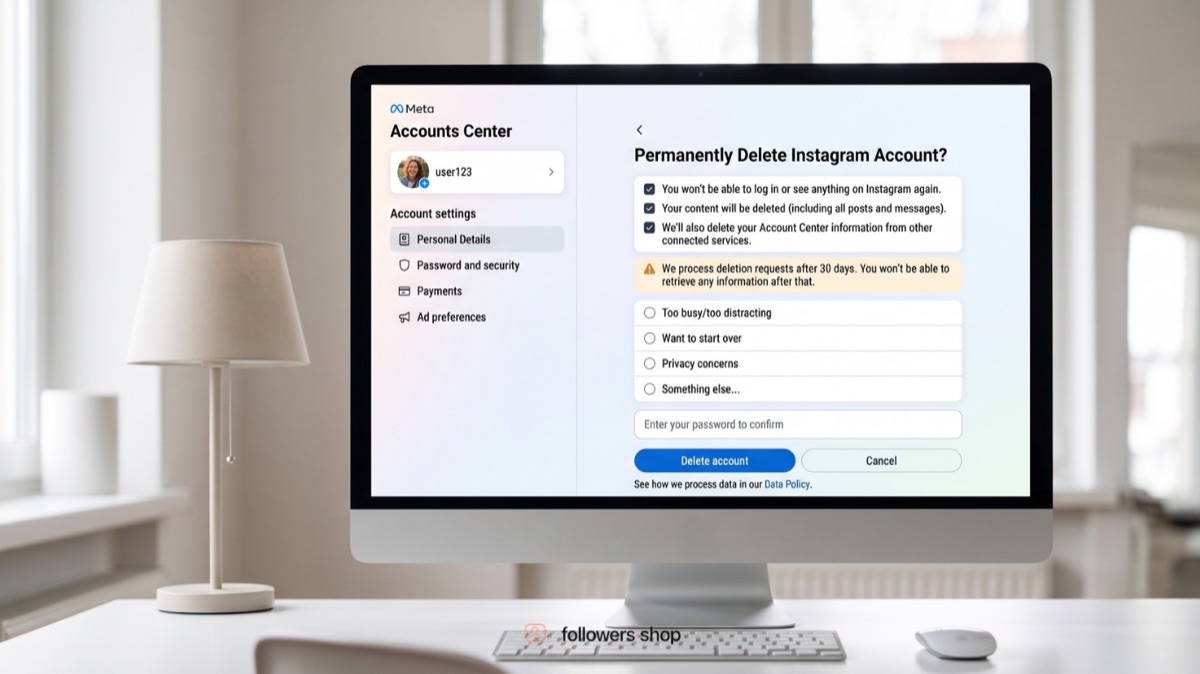
Follow these steps:
- Sign in to Instagram in your browser.
- Click More in the bottom-left corner.
- Open Settings.
- Select Accounts Center.
- Click Personal details.
- Open Account ownership and control.
- Select Deactivation or deletion.
- Choose the Instagram account.
- Click Delete account.
- Select Continue and complete the confirmation process.
Instagram's official computer instructions currently direct users through Personal details, followed by Account ownership and control and Deactivation or deletion.
If you cannot find the setting, confirm that you are signed in to the correct Instagram profile and try opening Accounts Center from the main settings menu.
What Happens When You Delete Your Instagram Account?
Deleting your Instagram account permanently removes your profile, photos, videos, comments, likes, and followers after the cancellation period ends. You will not be able to retrieve this information after permanent deletion.
Instagram normally hides the account from other users while the deletion request is pending. The information remains subject to Instagram's terms and privacy policies during this period, but it is not accessible to other people using Instagram.
After the cancellation deadline:
- Your profile is permanently deleted.
- Your posts and videos are removed.
- Your comments and likes are removed.
- Your followers and following connections are removed.
- You lose access to the information export tool.
- Your account information cannot normally be recovered.
Instagram states that the deletion process may take up to 90 days after it begins. Copies may also remain in backup systems for disaster recovery, software errors, legal obligations, safety investigations, or similar purposes. These backup copies are not the same as an active, publicly accessible Instagram profile.
Can You Cancel Instagram Account Deletion?
You may be able to cancel Instagram account deletion by signing back in before the cancellation deadline displayed during the deletion process. Once the account has been permanently deleted, it cannot normally be restored.
To cancel a pending request:
- Open Instagram.
- Sign in with your username and password.
- Review the deletion notice.
- Select the option to keep the account or cancel deletion.
- Confirm that you want to reactivate the profile.
Instagram commonly provides up to 30 days, but its official guidance notes that the cancellation period can vary by region. Always rely on the specific deletion date shown on your account.
After that date, Instagram says the information cannot be retrieved.
Should You Delete or Temporarily Deactivate Instagram?
You should delete Instagram only when you are confident that you no longer want the account or its content. Temporary deactivation is a better choice when you only want to hide your profile and take a break.
| Option | What Happens | Can You Return? |
|---|---|---|
| Delete account | Profile and account information are scheduled for permanent removal | Only before the cancellation deadline |
| Deactivate account | Profile and content are temporarily hidden | Yes, by signing back in |
| Log out | Account stays active, but you leave the current session | Yes |
| Remove login from device | Saved login details are removed from that device | Yes |
| Uninstall Instagram | The app is removed from the phone | Yes |
Instagram recommends temporary deactivation when a user wants a break without permanently removing photos, followers, and other account information.
How to Temporarily Deactivate Instagram
You can temporarily deactivate Instagram from the same Deactivation or deletion menu used for permanent deletion. Select Deactivate account instead of Delete account, enter your password, and confirm the request.
The path is generally: Accounts Center > Personal details or profile management > Deactivation or deletion > Deactivate account.
Your profile will remain hidden until you sign back in and reactivate it.
Why Can't I Delete My Instagram Account?
You may be unable to delete your account because you are signed in to the wrong profile, cannot access your password, are using an outdated app, or cannot locate the updated Accounts Center menu.
Try these solutions:
- Update the Instagram app.
- Check which account is currently active.
- Reset your Instagram password.
- Try the desktop website instead of the app.
- Open Accounts Center from your Facebook settings if the profiles are connected.
- Clear the app cache or browser cache.
- Try another browser or device.
- Disable browser extensions that may interfere with the page.
- Sign out and sign back in.
Instagram cannot submit the deletion request on your behalf. For security reasons, you must be able to access the account before requesting permanent deletion.
If you believe the account was hacked, recover and secure it before attempting deletion. Check for unfamiliar connected accounts and remove access granted to suspicious third-party applications.
FAQ
How do I delete my Instagram account permanently?
You can permanently delete your Instagram account by opening Accounts Center, selecting the profile management or personal details section, and choosing Deactivation or deletion. Select your Instagram profile, choose Delete account, and confirm the request. Download any information you want to keep before completing these steps.
Can I delete my Instagram account on my phone?
Yes, you can delete an Instagram account directly from the Instagram app on an iPhone or Android phone. Open your profile, enter Accounts Center, select the correct account, and choose Delete account. You do not need to use a computer to complete the process.
Does deleting the Instagram app delete my account?
No, deleting the Instagram app does not delete your Instagram account. It only removes the application from your phone. Your profile, followers, posts, likes, comments, and messages remain connected to the account. You can access them again by reinstalling Instagram or signing in through a browser.
Does removing an account from my phone delete it?
No, removing saved login information from a device does not permanently delete the Instagram account. It only removes the profile from the login screen on that device. The account remains active until you submit a deletion request through Accounts Center.
Can I delete Instagram without my password?
You generally need access to the Instagram account to request deletion. If you have forgotten your password, reset it through Instagram's account recovery process before attempting to delete the profile. Instagram does not delete an account for someone who cannot verify access to it.
Can I recover a permanently deleted Instagram account?
No, an Instagram account cannot normally be recovered after the permanent deletion deadline has passed. You may be able to stop deletion only during the cancellation period shown by Instagram. Signing back in before that deadline usually gives you an option to cancel the request.
Can I use the same username after deleting Instagram?
You may be able to register the same username again after deletion, provided another person has not claimed it. Instagram does not guarantee that the username will remain available. Accounts removed for violating Instagram's rules may also face additional restrictions on username reuse.
How long does Instagram account deletion take?
Instagram commonly makes the account permanently unrecoverable after the cancellation period, which is often 30 days. The complete technical deletion process may take up to 90 days, and certain backup records may be retained for security, legal, or recovery purposes. The date displayed on your own deletion confirmation screen is the most important deadline to follow.
Final Check Before You Delete Instagram
Before permanently deleting Instagram, confirm that you have selected the correct account, downloaded important information, and considered temporary deactivation. Once the cancellation deadline passes, your profile and account information cannot normally be restored.
Use this final checklist:
- Export the information you want to keep.
- Save important photos and videos separately.
- Check the username of the selected profile.
- Review connected business tools and subscriptions.
- Note the cancellation deadline.
- Choose deactivation when you are not completely certain.
- Confirm permanent deletion only when you are ready to lose access.
Deleting an Instagram account is straightforward, but the result is permanent after the cancellation period. Taking a few minutes to review your information can prevent the accidental loss of content, contacts, or a valuable username.