How to Recover Your Instagram Account: Step-by-Step Guide


You can recover an Instagram account in most cases by using the password reset flow, requesting a login link or security code, or following Instagram's account recovery checks. The right method depends on whether you forgot your password, lost access to your email or phone, were hacked, or can no longer complete the normal login process.
How to Recover Your Instagram Account
Start from the Instagram login screen and use the account recovery option instead of repeatedly trying passwords. Enter the username, email address, or phone number connected to the account, choose an available recovery method, and follow the verification instructions. Once access is restored, change the password and review the account's security settings.
Step 1: Open the Instagram Login Screen
Open the Instagram app on your phone. If another account is already signed in, go to the login screen or choose the option to add another account. The recovery process begins from the normal login page.
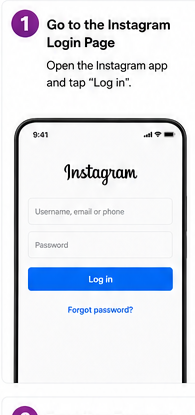
Step 2: Tap "Forgot Password?"
Tap Forgot password? or the equivalent recovery option shown on the login screen. Instagram may use slightly different wording depending on your device or app version.
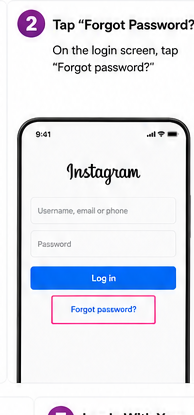
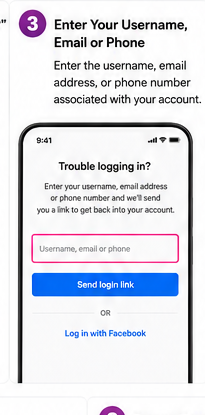
Step 3: Enter Your Username, Email, or Phone Number
Enter a username, email address, or phone number associated with the Instagram account. If one detail does not work, try another identifier you previously connected to the account.
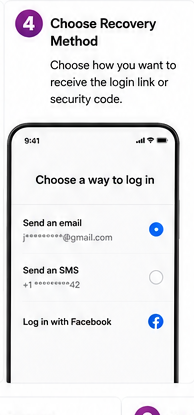
Step 4: Choose a Recovery Method
Instagram may offer an email, SMS, or another linked recovery method. Select a method you can currently access. A login link or security code will then be sent to that destination.
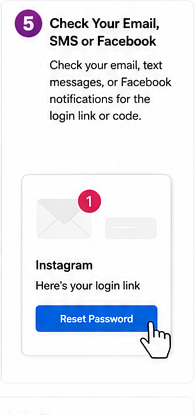
Step 5: Check Your Email or Messages
Open the email or text message from Instagram and use the login link or verification code. Check spam or junk folders if the message does not appear in your inbox.
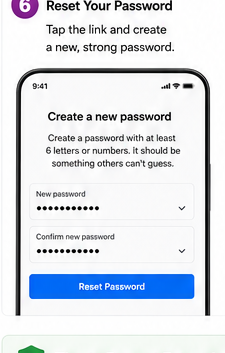
Step 6: Create a New Password
If Instagram asks you to reset the password, create a strong password that you do not use on another website or app. Avoid reusing a password that may already have been exposed.
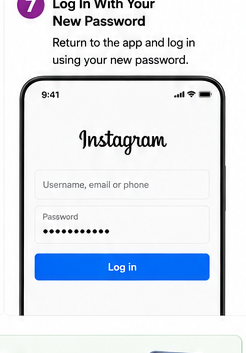
Step 7: Log In With the New Password
Return to Instagram and sign in with the new password. If you are asked to verify a recent login or device, complete the on-screen security check.
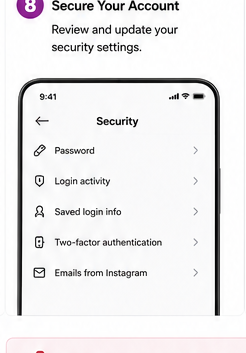
Step 8: Secure the Recovered Account
After you regain access, review Login activity, your connected email address and phone number, and two-factor authentication. Remove devices or contact details that you do not recognize.
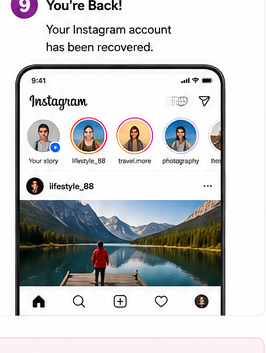
Step 9: Confirm That You Have Full Access
Check that your profile, messages, posts, settings, and account information are accessible again. If important account information was changed without your permission, update it immediately.
How to Get Your Instagram Account Back If You Forgot the Password
If you only forgot the password, the standard password reset process is usually enough. Use Forgot password? on the login screen, enter an account identifier, and request a recovery link or code. After verifying the request, set a new password and log in again.
How to Get Your Instagram Account Back If You Were Hacked
If someone changed your password, email address, phone number, or other account details, treat the issue as an account compromise. Look for security emails from Instagram about recent changes and use any option that allows you to reverse an unauthorized email change. If the normal reset flow no longer works, continue through Instagram's account recovery or hacked-account verification process.
Once you regain access, change the password, sign out of unfamiliar devices, review connected contact information, and enable two-factor authentication. Also change the password of the email account connected to Instagram if you believe that email account was compromised.
What If You No Longer Have Access to Your Email or Phone Number?
Try every account identifier you still remember, including your Instagram username. If Instagram offers another recovery option, use it. When none of the listed contact methods are available, follow the on-screen path for getting additional help or verifying your identity. The options shown can vary based on the account and the information Instagram can verify.
What If Instagram Disabled Your Account?
A disabled account is different from a forgotten-password or hacked-account case. If Instagram tells you that the account has been disabled, follow the review or appeal instructions shown when you attempt to log in. Password resets alone do not normally resolve a platform enforcement action.
What If You Deactivated the Account Yourself?
If you temporarily deactivated your Instagram account, you can usually reactivate it simply by logging back in with the correct credentials. This is different from permanent deletion. A deleted account may not be recoverable after Instagram's deletion process has been completed.
Why Is Instagram Account Recovery Not Working?
Recovery can fail when the username is entered incorrectly, the recovery email or phone number is outdated, the verification code has expired, or the account details were changed by someone else. Request a new code instead of repeatedly using an old one, check all available inboxes, and make sure you are recovering the correct Instagram username.
How to Protect Your Instagram Account After Recovery
- Use a unique password that is not shared with other services.
- Turn on two-factor authentication.
- Keep your recovery email address and phone number up to date.
- Review login activity and remove devices you do not recognize.
- Avoid entering your Instagram password on unofficial websites or apps.
- Be cautious with messages that claim you must verify your account through an external link.
FAQ
How do I recover my Instagram account?
Use the recovery option on the Instagram login screen, enter your username, email, or phone number, and complete the verification process using an available recovery method.
How do I get my Instagram account back if I forgot my password?
Tap Forgot password?, request a login link or verification code, create a new password, and log back in.
Can I recover Instagram without my old password?
Yes. The recovery flow is specifically designed to help you reset access when you no longer know the current password.
Can I get my Instagram account back after being hacked?
Often, yes. Use Instagram's recovery process and any security email that lets you reverse unauthorized account changes. Some cases require additional identity verification.
Can I recover Instagram without access to my email?
It depends on what other recovery methods are available for the account. Try the connected phone number, username, or any additional recovery option Instagram provides.
Does logging back in reactivate a temporarily deactivated Instagram account?
Usually, yes. A temporarily deactivated account can generally be restored by logging in again.
Final Takeaway
To recover an Instagram account, begin with the login recovery flow and use the username, email address, or phone number connected to the account. Complete the verification method Instagram provides, reset the password if necessary, and secure the account immediately after access is restored. If the account was hacked, disabled, or no longer has accessible recovery information, use the additional recovery or review options shown by Instagram.